Jump to content

MPC-VidPly

Universal, accessible video & audio player for TYPO3

VidPly TYPO3 Extension Logo

VidPly is a universal, accessible video and audio player extension for TYPO3 13/14. It offers comprehensive support for HTML5 media, YouTube, Vimeo, SoundCloud and HLS streaming with a privacy-oriented approach and full compliance with WCAG 2.1 AA accessibility guidelines.

System requirements

  • TYPO3 13.4+ or 14.x
  • PHP 8.2 or higher (8.3 recommended)
  • Composer installation required
  • Modern browsers: Chrome 90+, Firefox 88+, Safari 14+

Key features

  • External services with data protection as the top priority – YouTube, Vimeo, SoundCloud with GDPR-compliant declaration of consent
  • Media library – Reusable media recordings across your entire website
  • Automatic playlists – Two or more items automatically create playlists
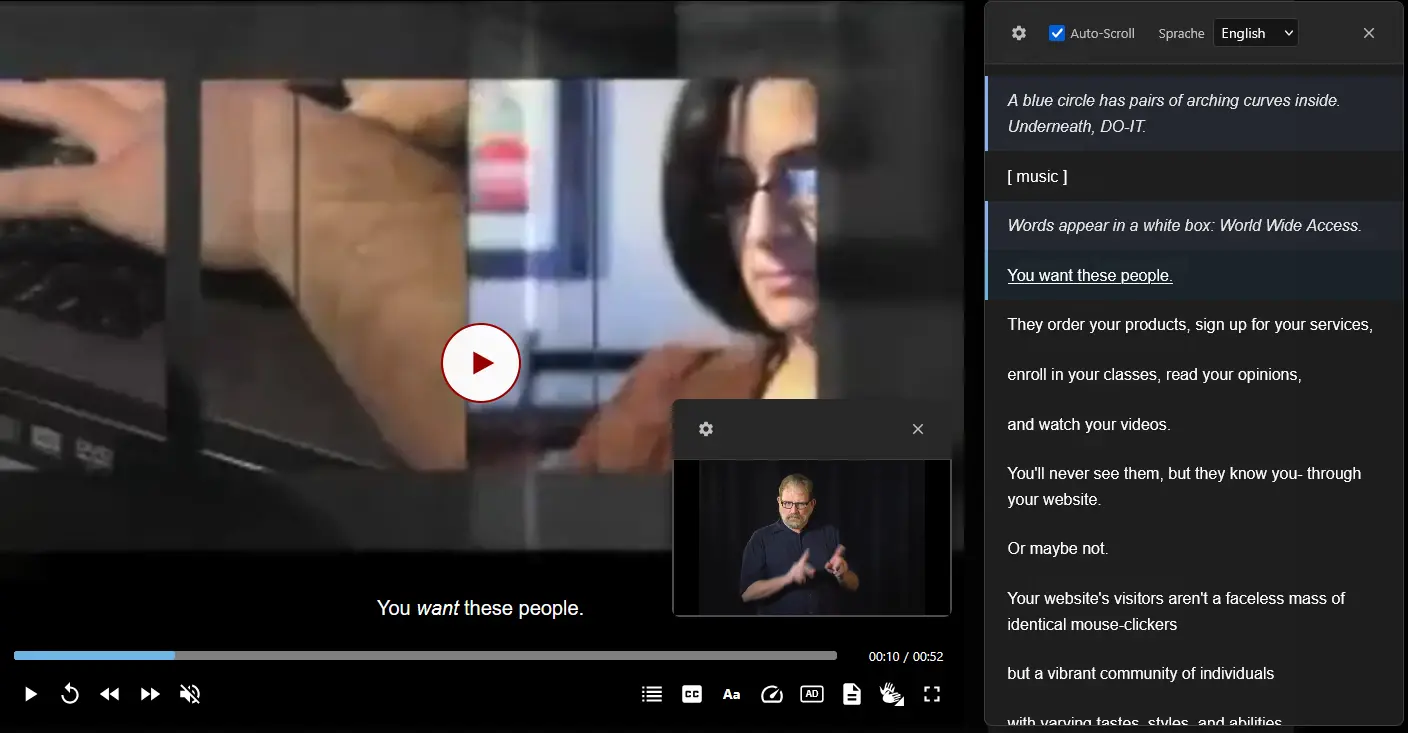
  • Full accessibility – Subtitles, chapters, audio description, sign language, keyboard control
  • HLS streaming – Adaptive bitrate streaming with hls.js
  • Modern player – Responsive design, picture-in-picture, quality switching, playback speed

Supported media types

TypeSourcePrivacy levelFormats/Notes
HTML5 videoUpload/URLNoMP4, WebM, OGG
HTML5 audioUpload/URLNoMP3, OGG, WAV
YouTubeVideo URLYesGDPR consent required
VimeoVideo URLYesGDPR consent required
SoundCloudTrack/set URLYesGDPR consent required
HLS.m3u8 URLNoAdaptive bitrate streaming

Data protection level (GDPR compliance)

For external services such as YouTube, Vimeo and SoundCloud, VidPly takes a data protection-oriented approach:

  • Before consent – Only a poster image and the play button are displayed.
  • No external requests – No tracking scripts or cookies are loaded until the user interacts
  • Clear privacy notices – Users are informed about data transfer to external services
  • One-click activation – The video is loaded and played immediately after consent is given
  • Multilingual support – Privacy notices available in German and English

Privacy-optimised embedding

  • YouTube uses the privacy-optimised domain youtube-nocookie.com
  • Clear player user interface with minimal branding
  • No recommendations for similar videos

Accessibility features

VidPly offers comprehensive support for accessibility in accordance with WCAG 2.1 AA:

Captions and subtitles

  • Support for WebVTT files (.vtt)
  • Support for multiple languages
  • Configurable track types: subtitles, captions, descriptions
  • Specifying language code and name

Chapters

  • WebVTT-based chapter markers
  • Visual chapter navigation
  • Jump to specific sections

Audio description

  • Alternative audio track for visually impaired users
  • Switch between standard and described video

Sign language

  • Overlay with sign language interpretation
  • Picture-in-picture display

Transcripts

  • Automatically generated, searchable transcripts from subtitles
  • Clickable text lines to jump to specific locations
  • Optional display of the transcript window

Player options

OptionStandardDescription
ControlsOnShow player controls
KeyOnEnable keyboard shortcuts
ResponsiveOnResponsive resizing
Automatic advanceOnAutomatically play next item in playlist
Automatic playbackOffStart automatically
RepeatOffRepeat content
TranscriptOffShow transcript window

Keyboard shortcut

  • Space bar or K – Play/Pause
  • M – Mute/Unmute
  • F – Full screen
  • C – Turn subtitles on/off
  • Left/right arrow – Fast forward/rewind 10 seconds
  • Up/down arrow – Increase/decrease volume by 10%
  • Home – Go to the beginning
  • End – Go to the end

Playlist functionality

  • Automatic creation – Select two or more media items to create a playlist
  • Visual panel – Thumbnail list with title navigation
  • Automatic advance – Automatically plays the next track
  • Repeat option – Repeat all tracks
  • Drag & drop order – Arrange items in any order

HLS streaming

  • Full HLS support via the hls.js library
  • Works in all modern browsers
  • Adaptive bitrate streaming
  • Compatible with Content Security Policy (CSP)
  • Ideal for live streams and long-form content

Conditional loading of assets

VidPly intelligently loads only the JavaScript required for specific media types:

  • External services (YouTube, Vimeo, SoundCloud) – Only PrivacyLayer.js (~5 KB)
  • Local videos/audio files – VidPlay core + PlaylistInit (~180 KB)
  • HLS streaming – Only adds hls.js when .m3u8 streams are detected
  • Playlists – PlaylistInit.js is only loaded for 2 or more items.

This results in a reduction of up to 97% in JavaScript overhead for external services.

Template structure

Modular fluid template parts for customisation:

  • VidPly/Assets.html – Asset registration
  • VidPly/VideoSources.html – Rendering of video sources
  • VidPly/AudioSources.html – Playback of audio sources
  • VidPly/Tracks.html – Subtitle and chapter tracks
  • VidPly/MetadataScripts.html – Accessibility metadata
  • VidPly/PrivacyLayer.html – Consent to external services

Two-step workflow

  1. Create media recordings – Create reusable media assets in the VidPly media library
  2. Add player to page – Insert a VidPly Player content element and select your media.

Installation

 
composer require mpc/mpc-vidply
 

After installation

  1. Perform the database update via the maintenance module.
  2. Insert the static template "VidPly Player (mpc_vidply)" on the home page.
  3. Clear all caches

Licence and author

VidPly is released under the GNU General Public Licence v2.0 or higher. Developed by Matthias Peltzer.

Share page

The time has come. After more than a decade of silence, Karnivool are back with In Verses — their fourth studio album. It feels a little more pop-oriented and tamer than their previous releases, but it's still highly recommended! The band is also on tour.